# Rebranding Surface AR Campaign

[![Rebranding Surface AR Campaign -IMG1.jpg](https://help.marvinxr.com/uploads/images/gallery/2025-03/rebranding-surface-ar-campaign-img1.jpg)](https://help.marvinxr.com/uploads/images/gallery/2024-03/branding.jpg)

##### Everything You Need To Know About WebAR Rebranding <span class="x1xsqp64 xiy17q3 x1o6pynw x19co3pv xdj266r xcwd3tp xat24cr x39eecv x2b8uid" data-testid="emoji"><span class="xexx8yu xn5pp95 x18d9i69 x2fxd7x x1yqt14a x1bhl96m">✌️</span></span>

##### Change Page Title

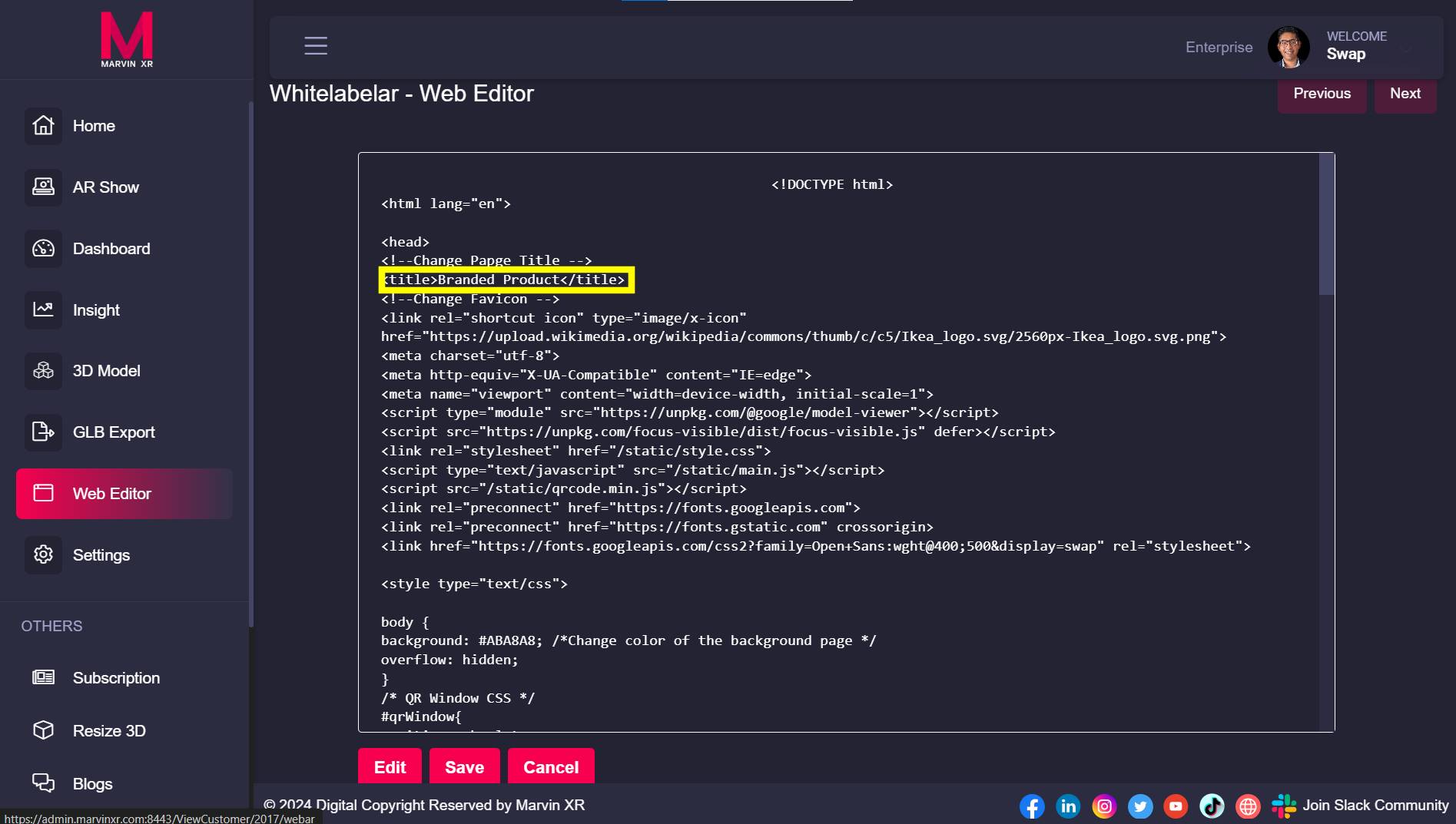
Open your Surface AR campaign and go to Web Editor and click on the Edit button.

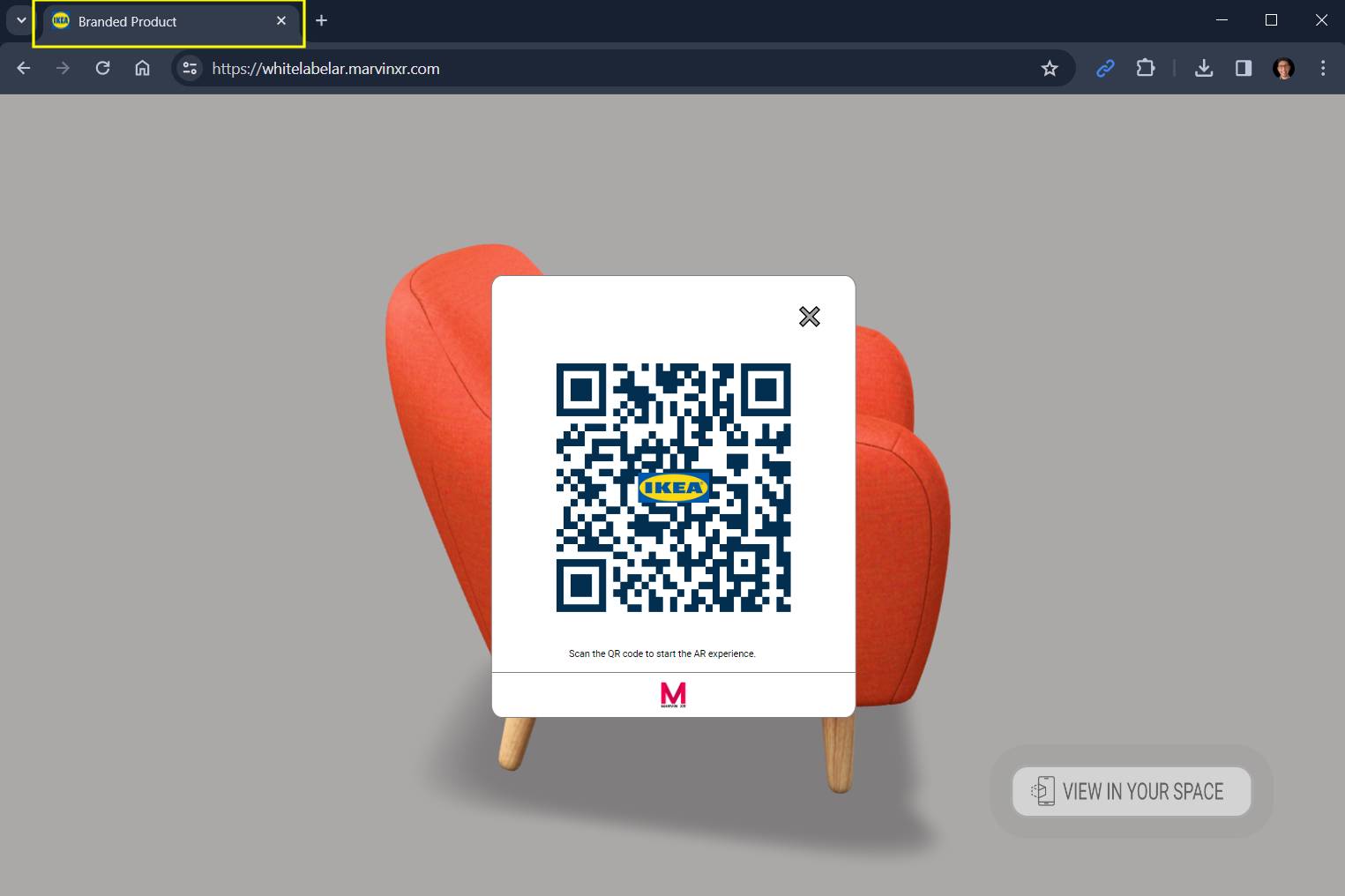
Find the **&lt;title&gt;** tag in the beginning of the page. Update your page name between the tags and Save.

```html
<title>Your Page Name</title>
```

<div id="bkmrk--1"><div class="cm-editor ͼ1 ͼ2 ͼ4 ͼ1p"><div class="cm-scroller" tabindex="-1"><div aria-hidden="true" class="cm-gutters"><div class="cm-gutter cm-lineNumbers"></div></div></div></div></div>[![Rebranding Surface AR Campaign -IMG2.jpg](https://help.marvinxr.com/uploads/images/gallery/2025-03/rebranding-surface-ar-campaign-img2.jpg)](https://help.marvinxr.com/uploads/images/gallery/2024-03/pagetitle.jpg)


##### Change Page Favicon (URL icon)

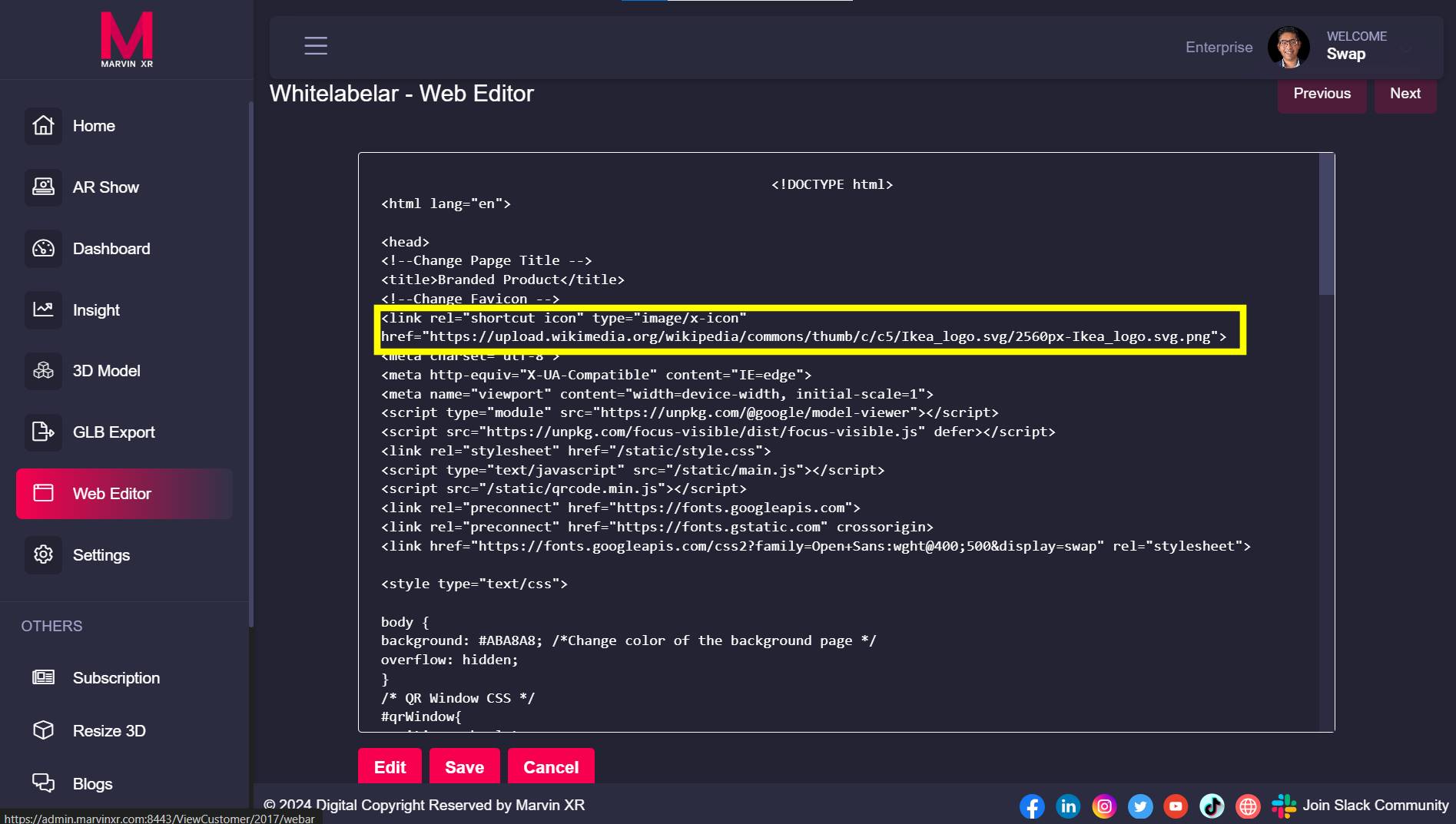
Find the comment ***Change Favicon*** and update the following **&lt;link&gt;** tag. Paste the address of the new favicon (must be a PNG file) link address to the **href** value and Save.

```html
<link rel="shortcut icon" type="image/x-icon" href="Insert PNG image file address">
```

<div bis_size="{"x":142,"y":620,"w":840,"h":44,"abs_x":332,"abs_y":837}" bis_skin_checked="1" class="CodeMirror cm-s-default" id="bkmrk--3" translate="no"><div bis_size="{"x":142,"y":642,"w":840,"h":22,"abs_x":332,"abs_y":859}" bis_skin_checked="1" class="CodeMirror-copy"><svg bis_size="{"x":142,"y":643,"w":16,"h":16,"abs_x":332,"abs_y":860}" height="16" viewbox="0 0 24 24" width="16" xmlns="http://www.w3.org/2000/svg"><path d="M0 0h24v24H0z" fill="none"></path><path d="M16 1H4c-1.1 0-2 .9-2 2v14h2V3h12V1zm3 4H8c-1.1 0-2 .9-2 2v14c0 1.1.9 2 2 2h11c1.1 0 2-.9 2-2V7c0-1.1-.9-2-2-2zm0 16H8V7h11v14z"></path></svg></div></div>[![Rebranding Surface AR Campaign -IMG3.jpg](https://help.marvinxr.com/uploads/images/gallery/2025-03/rebranding-surface-ar-campaign-img3.jpg)](https://help.marvinxr.com/uploads/images/gallery/2024-03/favicon.jpg)


##### Change Background Color

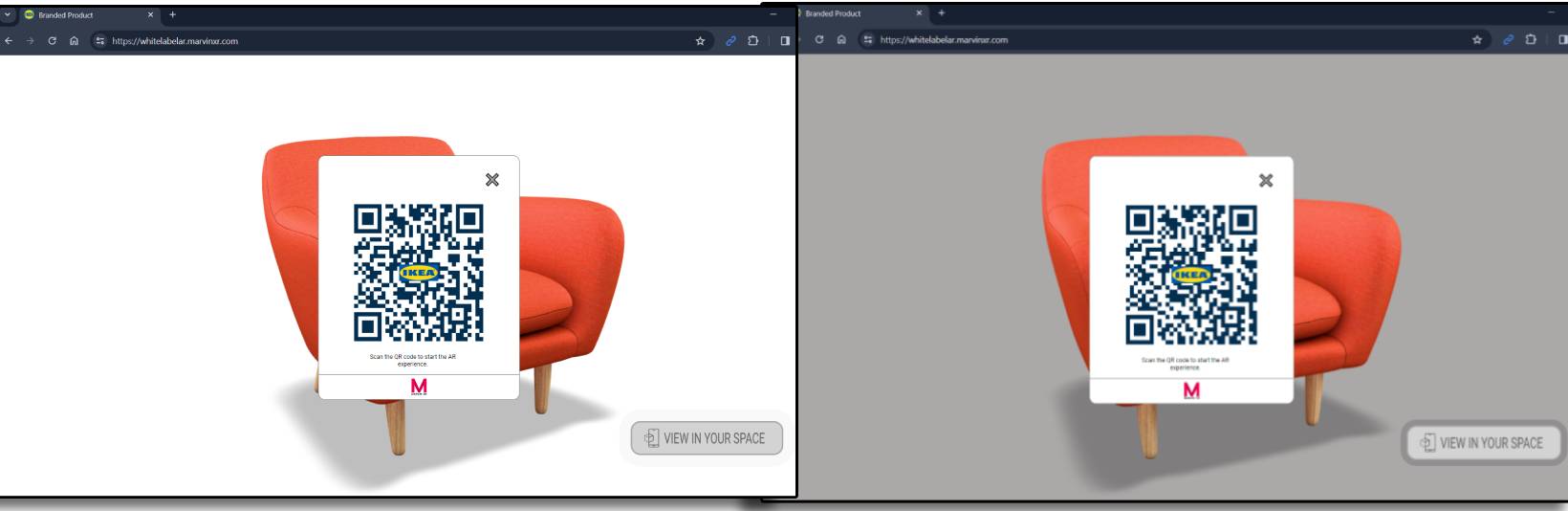
Find the comment in the CSS, the following comment - /\*Change color of the background page \*/  
Change the default hex color code for background and Save. Find color hex codes from [**here**](https://htmlcolorcodes.com/).

```css
background: #ABA8A8;
```

<div bis_size="{"x":142,"y":811,"w":840,"h":22,"abs_x":332,"abs_y":1028}" bis_skin_checked="1" class="CodeMirror cm-s-default" id="bkmrk--5" translate="no"><div bis_size="{"x":142,"y":811,"w":840,"h":22,"abs_x":332,"abs_y":1028}" bis_skin_checked="1" class="CodeMirror-scroll" tabindex="-1"><div bis_size="{"x":142,"y":811,"w":840,"h":22,"abs_x":332,"abs_y":1028}" bis_skin_checked="1" class="CodeMirror-sizer"><div bis_size="{"x":142,"y":811,"w":840,"h":22,"abs_x":332,"abs_y":1028}" bis_skin_checked="1"><div bis_size="{"x":142,"y":811,"w":840,"h":22,"abs_x":332,"abs_y":1028}" bis_skin_checked="1" class="CodeMirror-lines" role="presentation"><div bis_size="{"x":142,"y":811,"w":840,"h":22,"abs_x":332,"abs_y":1028}" bis_skin_checked="1" role="presentation"><div bis_size="{"x":142,"y":811,"w":840,"h":22,"abs_x":332,"abs_y":1028}" bis_skin_checked="1" class="CodeMirror-code" role="presentation"><div bis_size="{"x":142,"y":811,"w":840,"h":22,"abs_x":332,"abs_y":1028}" bis_skin_checked="1"><div aria-hidden="true" bis_size="{"x":142,"y":811,"w":840,"h":22,"abs_x":332,"abs_y":1028}" bis_skin_checked="1" class="CodeMirror-gutter-wrapper"></div></div></div></div></div></div></div></div></div><div bis_size="{"x":142,"y":886,"w":840,"h":67,"abs_x":332,"abs_y":1103}" bis_skin_checked="1" class="CodeMirror cm-s-default" id="bkmrk--6" translate="no"><div bis_size="{"x":142,"y":886,"w":840,"h":44,"abs_x":332,"abs_y":1103}" bis_skin_checked="1" class="CodeMirror-scroll" tabindex="-1"><div bis_size="{"x":142,"y":886,"w":840,"h":22,"abs_x":332,"abs_y":1103}" bis_skin_checked="1" class="CodeMirror-sizer"><div bis_size="{"x":142,"y":886,"w":840,"h":22,"abs_x":332,"abs_y":1103}" bis_skin_checked="1"><div bis_size="{"x":142,"y":886,"w":840,"h":22,"abs_x":332,"abs_y":1103}" bis_skin_checked="1" class="CodeMirror-lines" role="presentation"><div bis_size="{"x":142,"y":886,"w":840,"h":22,"abs_x":332,"abs_y":1103}" bis_skin_checked="1" role="presentation"><div bis_size="{"x":142,"y":886,"w":840,"h":22,"abs_x":332,"abs_y":1103}" bis_skin_checked="1" class="CodeMirror-code" role="presentation"></div></div></div></div></div><div bis_size="{"x":142,"y":909,"w":840,"h":22,"abs_x":332,"abs_y":1126}" bis_skin_checked="1" class="CodeMirror-gutters"></div></div><div bis_size="{"x":142,"y":931,"w":840,"h":22,"abs_x":332,"abs_y":1148}" bis_skin_checked="1" class="CodeMirror-copy"><svg bis_size="{"x":142,"y":932,"w":16,"h":16,"abs_x":332,"abs_y":1149}" height="16" viewbox="0 0 24 24" width="16" xmlns="http://www.w3.org/2000/svg"><path d="M0 0h24v24H0z" fill="none"></path><path d="M16 1H4c-1.1 0-2 .9-2 2v14h2V3h12V1zm3 4H8c-1.1 0-2 .9-2 2v14c0 1.1.9 2 2 2h11c1.1 0 2-.9 2-2V7c0-1.1-.9-2-2-2zm0 16H8V7h11v14z"></path></svg></div></div>[![Rebranding Surface AR Campaign -IMG4.jpg](https://help.marvinxr.com/uploads/images/gallery/2025-03/rebranding-surface-ar-campaign-img4.jpg)](https://help.marvinxr.com/uploads/images/gallery/2024-03/coloring.jpg)


##### Change QR Window Size

If you want to change the default QR popup window default sizing, please change value next to the following comments: /\* QR Window CSS \*/

To change popup window width - change the values next to /\*Change QR window width\*/  
To change popup window height- change the values next to /\*Change QR window height\*/

```css
#qrWindow{
position: absolute;
margin:auto;
background: rgb(255,255,255);
width: 100vmin;  /*Change QR window width*/
max-width: 330px;
height: 100vmin; /*Change QR window height*/
max-height: 400px;
left: 50%;
top: 50%;
transform: translateX(-50%) translateY(-50%);
z-index: 10000;
border: solid 1px gray;
border-radius: 3%;
}
```

<div class="cm-line" id="bkmrk-change-logo-in-qr-co">Change Logo in QR Code</div><div id="bkmrk--9"><div class="cm-editor ͼ1 ͼ2 ͼ4 ͼ1s"><div class="cm-scroller" tabindex="-1"></div></div></div>This is quite easy. Simply follow this existing tutorial to [**change logo in QR code**](https://help.marvinxr.com/books/marvin-xr-help-manual/page/create-custom-qr).